


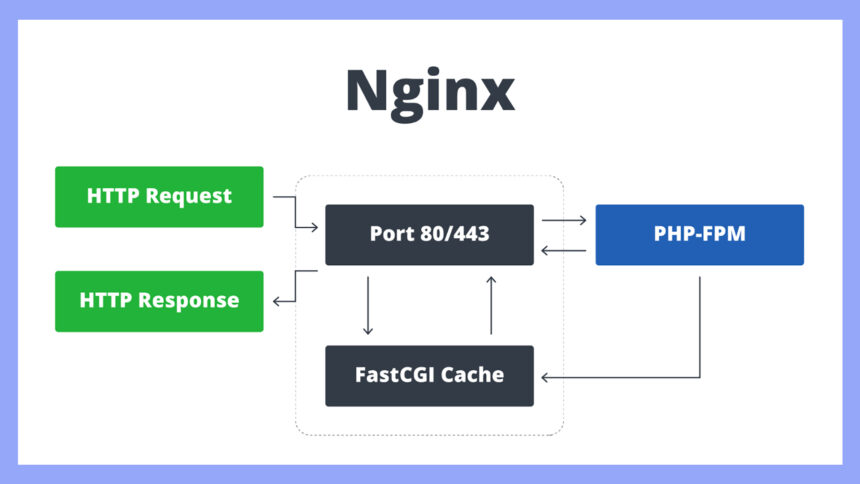
Introduction to Cache and Its Functionality
In the realm of computing, cache refers to a component that stores data so future requests for that data can be served faster. This reduces latency and enhances overall system performance. By providing a temporary storage area for frequently accessed information, cache systems minimize the time and resources required to access data from the primary storage, such as a hard drive or a remote server.
There are several types of cache, each serving a distinct purpose. The most commonly encountered is browser cache, which retains web pages and resources to speed up the loading of websites that a user visits repeatedly. By storing elements like images, scripts, and entire pages, browsers can deliver content more swiftly on subsequent visits, improving user experience significantly.
Another important type is server cache, often found in web hosting environments. This cache works at the server level, storing responses to requests made to the server. By caching responses, servers can drastically reduce the load time for users, as they can deliver cached responses rather than having to process each request anew. Furthermore, server cache helps in decreasing bandwidth consumption, making it a critical component of high-performance web applications.
Lastly, application cache is utilized by software applications to store data that is frequently used or computationally expensive to retrieve. This enables applications to operate more efficiently, especially in environments where connectivity may be intermittent, thereby providing a better overall experience to users.
Overall, the effectiveness of caching mechanisms relies on their ability to balance speed and resource management, ensuring data is readily available while minimizing delays, thus highlighting the vital role of cache in enhancing performance across various computing scenarios.
Why Purging Caches Is Necessary
Cache purging is a vital process in web management that helps maintain the accuracy and performance of web applications. One primary reason for purging caches is to clear outdated content. As web pages are updated with new information, images, or features, the cached versions can inadvertently display stale data to users. This can lead to confusion and dissatisfaction, as visitors may not receive the latest content. Therefore, regular cache purging ensures that users always see the most current information, which is crucial for maintaining credibility and trust.
In addition to presenting outdated information, unpurged caches can also contribute to errors on websites. For instance, if a website goes through substantial changes—such as layout modifications, server updates, or plugin installations—the cached versions may conflict with the new files. This discrepancy can result in broken links, missing images, or other technical issues that hinder the user experience. By implementing a systematic cache purging routine, web administrators can significantly reduce the likelihood of encountering such errors, ensuring a smoother operation.
Cache purging becomes particularly necessary in specific scenarios, particularly during software updates or significant content changes. For example, when a new feature is deployed, or there is a change in HTML structure, purging cached data is essential to avoid inconsistencies. Similarly, in the troubleshooting process, developers might need to purge caches to eliminate potential causes of erroneous behavior. By doing so, they can effectively diagnose and fix issues without the interference of outdated assets.
In conclusion, purging caches not only improves user experience by reducing outdated content and errors but also acts as a fundamental practice in web maintenance, ensuring that the most relevant files are accessible to users at all times.
Different Methods of Cache Purging
Cache purging is an essential maintenance task that ensures systems run efficiently. There are several methods available for purging caches across different platforms and applications, each with its unique advantages and considerations.
One common method is the manual cache purging, where users or administrators manually clear cache files or directories. This method is straightforward and gives users full control over what to purge. However, it can be time-consuming and prone to human error, particularly in larger systems.
Automated scripts provide a more efficient solution for cache purging. These are scripts programmed to execute specific commands at scheduled intervals, which can include purging cache. Utilizing automation reduces the risk of error and saves valuable time, particularly when dealing with frequent updates or changes. The downside is that scripts require initial setup and testing to ensure they function correctly without disrupting other processes.
Many software applications also come with built-in tools for cache management. These tools offer a user-friendly interface for purging caches and are often designed to minimize the impact on system performance. Many applications allow for targeted cache purging, which means users can selectively clear data that is outdated or no longer relevant. On the flip side, relying solely on built-in tools may limit flexibility and customization in cache management.
In summary, selecting the appropriate method for cache purging largely depends on the needs of your system and the specific circumstances. Whether through manual processes, automated scripts, or built-in tools, understanding each method’s advantages and drawbacks is crucial for maintaining optimal system performance.
The Step-by-Step Process of Purging Caches
Purging caches is a crucial maintenance task for ensuring that your web applications run efficiently. The following steps outline the process across various platforms, allowing for a successful and effective cache purge.
1. Identify the Cache Type: Before proceeding with the cache purging process, determine which type of cache you intend to purge. Common types include browser caches, CDNs (Content Delivery Networks), application caches, and server-side caches. Understanding which cache needs to be purged is essential for targeting the right area and for ensuring that users receive the most current content.
2. Access Caching Settings: Once you have identified the cache type, access the settings or control panel of the platform you are using. For instance, if using a CDN, log in to your CDN service account to locate cache management settings. For web applications, you may find cache management options in the administration dashboard.
3. Choose the Purging Method: Depending on the platform, you can either purge the entire cache or selectively clear specific items. A full purge is usually straightforward but may cause users to experience slight delays while the cache rebuilds. In contrast, selective purging allows you to target only the content that has changed, which can minimize disruption.
4. Execute the Purge: Follow the prompts to execute the purge. This may involve clicking a “clear” or “purge” button on the cache management interface. In the case of command-line tools or scripts, ensure that you execute the correct command or script to initiate the cache-clearing process.
5. Verify the Results: Once the purge is completed, verify that the cache has been successfully cleared. You can do this by navigating to the website or application and checking for any updates or changes in the content. Utilize tools such as browser developer tools to inspect the cache status and ensure that the latest content is being served.
6. Monitor Performance: After purging the cache, it is advisable to monitor the performance of the site or application to ensure that everything is functioning as expected. Look out for any lag or errors that might occur post-purge.
Impact of Effective Cache Purging on Performance
Effective cache purging is critical in maintaining optimal system performance and enhancing user experience. When cache storage becomes cluttered with outdated or unused data, it can lead to longer load times, increased latency, and a general decline in the application’s reliability. Regularly purging the cache ensures that the most relevant data is readily accessible, thereby improving system responsiveness.
For instance, a study conducted by Google indicates that even a one-second delay in page load time can result in a 20% decrease in customer satisfaction. By implementing an effective cache purging strategy, organizations can significantly lower load times, ensuring a smoother user journey. If caches are cleaned at the right intervals, unnecessary data can be removed, thus allowing faster access to the necessary resources. The outcome is a swift response time that meets user expectations, particularly in applications where speed is critical.
Moreover, data from CDN (Content Delivery Network) service providers suggest that effective cache purging can reduce server response times by up to 50%. This improvement can be attributed to the reduced amount of data that servers have to sift through to respond to requests. As a result, the system experiences a boost in overall efficiency, translating to better performance metrics.
Additionally, the reliability of an application benefits from regular cache purging. Users are less likely to encounter errors or outdated information when the cache is frequently updated. This is particularly important for websites that depend on real-time data, such as e-commerce platforms or news sites. An efficient cache purging process not only sustains performance but also enhances user trust in the system, fostering long-term engagement and loyalty.
Common Mistakes to Avoid When Purging Caches
Cache purging is an essential process in maintaining the efficiency of systems and applications. However, several common mistakes can undermine its effectiveness. Recognizing these pitfalls is crucial for ensuring that cache purging is executed efficiently and correctly.
One of the most frequent mistakes is failing to perform a comprehensive analysis of what data needs purging. Organizations may only focus on specific data, which can lead to inconsistent performance. It is important to assess cache contents thoroughly to identify the targeted data effectively. Failing to do so can result in lingering outdated information while other critical data remains cached.
Another common error is neglecting to establish a clear cache purging policy. Without a defined protocol, cache purging can become reactive rather than proactive, leading to disorganized processes and potential service interruptions. Developing a structured policy helps teams understand the circumstances under which purging should occur and ensures that it happens at appropriate times, which minimizes the negative impact on users.
A third mistake involves underestimating the time required for cache purging. Many teams initiate purging actions without considering the time it may take for the changes to propagate through the system. This could lead to situations where users encounter inconsistent data if they access the system during the purging process. It is important to schedule purging operations during off-peak hours to mitigate disruption.
Finally, ignoring the logs and status indicators during the cache purging process can lead to missed errors or issues that may arise. Monitoring the operation ensures that unexpected behavior is noted and addressed promptly, thus avoiding prolonged performance issues. By being aware of these common pitfalls and implementing sound practices, the cache purging process can increase operational effectiveness and maintain data integrity.
Tools and Software for Cache Management
Effective cache management is an essential aspect of optimizing webpage performance and ensuring a smooth user experience. Various tools and software options are available to address the needs of different systems, catering to users ranging from individuals to enterprises. When assessing which cache management solution to implement, it is critical to consider both free and paid tools, as well as evaluating their features and compatibility.
One widely-used free tool for cache management is WP Super Cache. Designed primarily for WordPress users, it generates static HTML files, allowing for faster loading times by reducing server overload. Another notable free option is W3 Total Cache, which offers additional performance optimization features, including database caching and minification of CSS and JavaScript files.
For those seeking comprehensive solutions, both Varnish Cache and Akamai offer robust paid options. Varnish Cache is particularly powerful for high-traffic websites; it functions as an HTTP accelerator to cache static content, significantly reducing server response times. Akamai, on the other hand, provides a complete content delivery network (CDN) service that includes caching among its features, enhancing overall performance and security.
Additionally, browser cache management tools such as Cache Cleaner allow users to maintain and clear their browser caches effortlessly. Compatibility with various systems is a crucial consideration; thus, it is advisable to test tools on staging environments before deploying them into production.
Overall, the choice of cache management software and tools depends on individual needs, budget, and the specific environment in which they will be used. Evaluating these options will help ensure effective cache purging and management, promoting better performance and user satisfaction.
Real-World Examples and Case Studies
Cache purging is not merely a theoretical concept; it plays a crucial role in the operational efficiency of various businesses and systems. An illustration of this can be seen in the case of a large eCommerce platform that experienced significant slowdowns during peak traffic periods. The website, which served millions of customers daily, relied heavily on cached data to load products quickly. However, outdated cached information led to incorrect product availability and pricing, resulting in customer dissatisfaction and abandoned carts.
Upon implementing a regular cache purging strategy, the company was able to refresh their cached data at optimal intervals, ensuring accurate information was always presented to users. As a result, they observed a marked improvement in site performance, an increase in customer satisfaction, and ultimately a boost in sales conversions. This situation clearly highlights the importance of efficient cache management in maintaining both user experience and revenue.
Another pertinent example can be drawn from a media streaming service. This platform faced challenges with buffering and load times during specific high-demand events, such as live sports broadcasts. The service relied on server-side caching to deliver content quickly; however, the static cache entries became a bottleneck as real-time data was necessary for a seamless viewing experience. With ineffective cache strategy management, viewers reported frequent interruptions and degraded performance.
By introducing an automated cache purging mechanism to refresh content at critical junctures, the streaming service significantly improved its operational throughput. Post-implementation, they reported that viewer complaints decreased by over 30% during peak times, showcasing that proper management of cache not only enhances performance but also strengthens user engagement. These examples serve as tangible evidence of the benefits of effective cache management, underpinning the necessity for businesses to adopt dynamic cache purging processes for maintaining optimal performance.
Conclusion and Best Practices for Cache Purging
In conclusion, cache purging plays a critical role in maintaining the optimized performance of web applications and systems. Regular cache management ensures that outdated or irrelevant data does not hinder the efficiency of applications, leading to improved load times and better user experiences. Moreover, effective cache purging is essential for accurately reflecting updates made to content, which is vital for businesses that depend on real-time information and consistent user engagement.
To implement best practices in cache purging, organizations should first establish a clear understanding of their cache behavior and strategies that align with their typical usage patterns. This might involve monitoring how often data is accessed and determining optimal purging frequencies based on usage spikes or specific content changes. Setting a schedule for periodic purging, whether it be daily, weekly, or monthly, can help in reducing the chances of serving stale content.
Furthermore, leveraging strategies such as time-based cache expiry, where cache entries automatically invalidate after a set duration, can simplify ongoing management. This ensures that the cache remains current without requiring constant manual intervention. Implementing versioning for cached resources can also enhance control over what gets purged and when, allowing teams to maintain app performance during updates smoothly.
Encouraging teams to regularly review their cache settings as part of routine system maintenance is paramount. By fostering a culture that prioritizes cache optimization, organizations can ultimately enhance their system’s reliability and user satisfaction. Through these practices, it becomes clear that effective cache purging not only improves application performance but also contributes to a more efficient and responsive system overall.