


Networking Meaning: A Simple Explanation
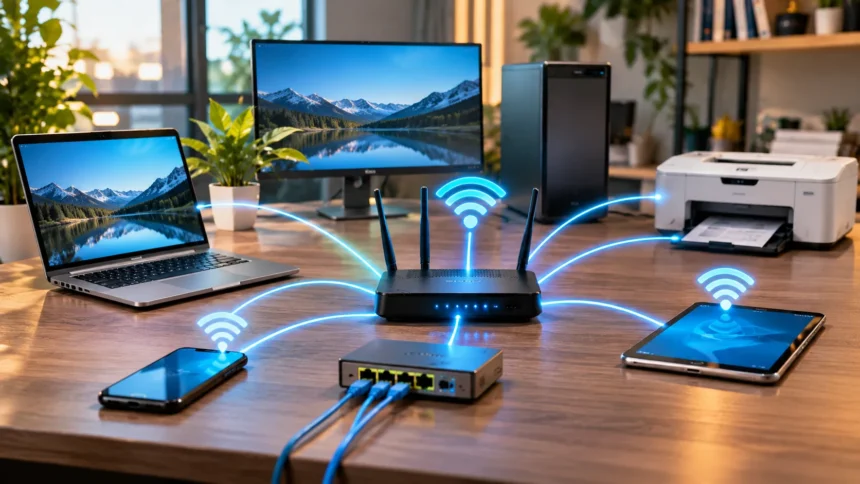
Networking means connecting two or more devices so they can communicate, exchange information, and share resources. These devices may include computers, smartphones, printers, servers, and other electronic equipment. Understanding networking meaning helps beginners learn how modern communication systems work and how people access digital services at home, school, and in the workplace.
A simple example of networking is connecting your smartphone and laptop to the same Wi-Fi router. Both devices can access the internet and may share information through the local network when properly configured. Without networking, many everyday activities, such as sending emails, attending online meetings, and accessing cloud storage, would become much more difficult.
Networking can also refer to building professional relationships with other people to exchange knowledge and discover opportunities. However, in computer technology, networking primarily focuses on connecting devices and enabling digital communication. Learning the basic concepts of computer networking provides a useful foundation for understanding information technology, cybersecurity, cloud computing, and internet services.
What Is Networking in Computer Technology?
Computer networking is the process of connecting electronic devices through wired or wireless communication systems. These connections allow devices to send, receive, and exchange information without requiring users to transfer files manually. Networks can be small enough to serve a single household or large enough to connect millions of devices worldwide.
A computer network allows multiple users to access shared resources, including printers, storage devices, software applications, and internet connections. For example, employees in an office can access documents stored on a central server instead of keeping separate copies. This arrangement makes communication easier and helps organizations manage their digital resources more efficiently.
Networking systems depend on hardware, software, and communication rules that allow connected devices to work together. Routers, switches, network cables, and wireless access points are common components of these systems. Each component performs a specific function that supports reliable communication and helps information reach its intended destination across the computer network.
How Does Networking Work?
Networking works by transferring information between connected devices using established communication methods and protocols. When you send a message or open a website, your device prepares the necessary information for transmission across a network. This information is often divided into smaller units called packets, which travel between devices through available communication paths.
Network equipment helps direct these packets toward their intended destinations using addresses and routing information. For example, a router determines where information should be forwarded when your computer communicates with an online service. Different networking devices work together to ensure that information moves between local networks and remote systems when required.
Once the information reaches its destination, the receiving device processes it and presents the appropriate result to the user. This entire process can happen within a fraction of a second under suitable network conditions. Reliable networking depends on connection quality, available bandwidth, correct device settings, and properly functioning communication equipment throughout the system.
Main Types of Computer Networks
A Local Area Network, commonly known as a LAN, connects devices within a limited geographical area such as a home, school, or office. These networks allow users to share local resources and communicate with nearby devices. LANs are widely used because they provide a practical way to connect equipment within a specific location.
A Wide Area Network, or WAN, connects devices and smaller networks across larger geographical distances. Businesses may use WANs to connect offices located in different cities or countries and maintain communication between their employees. The internet is the largest example of interconnected networks operating across extensive geographical areas around the world.
Other network types include Personal Area Networks, Metropolitan Area Networks, and Wireless Local Area Networks, which serve different communication requirements. A Personal Area Network connects nearby personal devices, while a Metropolitan Area Network covers a larger urban region. Wireless Local Area Networks use wireless technology to connect devices within a limited area without physical network cables.
Important Components of a Computer Network
Routers are important networking devices that connect separate networks and direct information between them. A home router typically connects your local network to your internet service provider’s network, allowing multiple devices to access online services. Routers use network addresses and routing information to determine where outgoing information should be forwarded.
Network switches connect multiple devices within a local network and help information reach the appropriate connected device. They are commonly used in offices, schools, and data centers where many computers require reliable network communication. Unlike basic network hubs, switches can use device addresses to forward most local network traffic more efficiently.
Other important networking components include modems, Ethernet cables, wireless access points, and network interface cards that support device connectivity. A modem or similar access device helps connect a network to an internet service provider, depending on the connection technology. Together, these components create the infrastructure needed for reliable data transmission and resource sharing.
Wired Networking vs. Wireless Networking
Wired networking uses physical cables to connect computers, routers, switches, and other compatible devices within a network. Ethernet cables are commonly used because they provide reliable connections and support high data transfer speeds. Wired networks are particularly useful in environments where stable connectivity and consistent performance are important for completing everyday tasks.
Wireless networking allows devices to communicate through radio signals instead of depending on physical network cables for every connection. Wi-Fi is one of the most familiar examples of wireless networking and is widely available in homes, schools, and businesses. It provides flexibility by allowing compatible devices to connect while users move around within the coverage area.
Both wired and wireless networking offer advantages depending on the environment, equipment, and communication requirements involved. Wired connections often provide more consistent performance, while wireless connections offer greater convenience and mobility for everyday users. Many modern organizations combine both networking methods to create flexible systems that support different devices and operational needs.
Understanding Network Protocols and IP Addresses
Network protocols are established rules that determine how devices communicate and exchange information across computer networks. These rules help different devices understand how information should be formatted, transmitted, received, and processed during communication. Without compatible networking protocols, computers and other electronic equipment would struggle to exchange information reliably with one another.
An Internet Protocol address, commonly called an IP address, identifies a network interface and helps information reach the appropriate destination. Devices typically receive IP addresses when they connect to a computer network, either automatically or through manual configuration. These addresses play an important role in local network communication and internet connectivity.
Common networking protocols include TCP, IP, HTTP, HTTPS, and DNS, each serving a different purpose within digital communication systems. For example, DNS helps translate website names into network addresses, while HTTPS protects web communication using encryption. Understanding these basic protocols makes it easier for beginners to recognize how everyday internet services operate behind the scenes.
Common Examples of Networking in Everyday Life
Home Wi-Fi networks are among the most familiar examples of networking because they connect multiple personal devices to shared internet services. Smartphones, laptops, smart televisions, and other compatible equipment can communicate through the same wireless network. This arrangement allows household members to browse websites, stream educational content, and complete online activities simultaneously.
Office networks provide another practical example by connecting employees to shared printers, business applications, databases, and storage systems. Instead of transferring documents manually between computers, workers can access authorized resources through their organization’s network. This improves collaboration and helps businesses maintain organized communication systems across different departments and working environments.
Bluetooth connections also demonstrate how networking supports communication between nearby electronic devices during everyday activities. Wireless headphones, keyboards, speakers, and smartwatches can exchange information with compatible smartphones or computers using Bluetooth technology. Although these connections usually operate over relatively short distances, they provide a convenient way to connect personal devices without additional cables.
What Are the Benefits of Computer Networking?
One of the main benefits of computer networking is resource sharing, which allows multiple users to access common devices and digital services. Organizations can connect several computers to shared printers, storage systems, and internet connections rather than purchasing separate equipment for every employee. This approach can reduce unnecessary expenses and simplify resource management.
Networking also improves communication by allowing users to exchange messages, share documents, and participate in online meetings from different locations. Businesses can use connected systems to support teamwork between employees who work in separate offices or from home. Educational institutions also benefit from networking through digital classrooms, shared learning materials, and online research tools.
Centralized information management is another advantage of networking because organizations can store important files and applications in accessible locations. Authorized users can retrieve information when needed, while administrators can manage permissions, backups, and security settings more effectively. These capabilities help businesses maintain organized operations and support reliable access to important digital resources.
Common Networking Challenges and Problems
Network connectivity problems can occur when devices experience weak signals, damaged equipment, incorrect settings, or interruptions from internet service providers. These issues may prevent users from accessing websites, sharing documents, or communicating with other connected devices. Identifying the underlying cause is important because similar connection problems can result from several different networking issues.
Network congestion occurs when many devices attempt to use limited communication resources at the same time. This can lead to slower download speeds, delayed responses, and reduced performance during activities that require stable internet access. Businesses can manage congestion through appropriate network planning, sufficient bandwidth, and equipment designed to handle their expected communication requirements.
Security threats represent another important challenge because connected devices may become vulnerable to unauthorized access and other harmful activities. Weak passwords, outdated software, and poorly configured equipment can increase these risks within computer networks. Regular maintenance, appropriate security controls, and employee awareness help organizations protect their information and maintain dependable network performance.
Why Is Network Security Important?
Network security involves protecting connected devices, communication systems, and digital information from unauthorized access, disruption, and misuse. As more personal and business activities depend on computer networks, protecting these systems has become increasingly important. Effective security practices help reduce the likelihood of information loss and interruptions that could affect everyday operations.
Firewalls, encryption, antivirus software, and access controls are commonly used to improve the security of computer networks. These tools perform different protective functions, such as filtering suspicious network traffic and restricting access to sensitive information. However, security technologies work best when combined with regular software updates and responsible behavior from network users.
Individuals can improve their network security by using strong passwords, keeping devices updated, and enabling appropriate security settings on their routers. Businesses should also establish clear security policies, monitor network activity, and provide employees with cybersecurity awareness training. These measures help create safer digital environments while supporting reliable communication and protecting valuable information.
Networking vs. the Internet: What Is the Difference?
Networking refers to the process of connecting devices so they can communicate and share information with one another. A computer network can operate independently without requiring an active internet connection, depending on its purpose and configuration. For example, computers connected within an office may share local files even when external internet services are unavailable.
The internet is a global system of interconnected networks that enables communication between devices and services across the world. It allows users to access websites, send emails, participate in online meetings, and use various cloud-based applications. Internet communication depends on established protocols that help different networks exchange information across large geographical distances.
The main difference is that networking is a broader concept involving device connectivity, while the internet represents a worldwide collection of interconnected networks. Every internet connection depends on networking technology, but not every computer network requires internet access. Understanding this distinction helps beginners recognize the relationship between local communication systems and global digital services.
How Beginners Can Learn Computer Networking
Beginners can start learning computer networking by understanding basic concepts such as IP addresses, routers, switches, and different network types. Learning how these components work together provides a useful foundation for exploring more advanced networking topics. Simple examples involving home Wi-Fi connections can make unfamiliar technical concepts easier to understand and remember.
Practical learning is another effective way to develop networking knowledge without relying entirely on theoretical explanations. Beginners can explore their own device network settings, learn how local connections work, and practice using educational network simulation software. These activities help learners understand communication processes and become familiar with common networking terminology in controlled environments.
As their knowledge improves, beginners can explore topics such as network topology, subnetting, network management, and cybersecurity fundamentals. Online courses, educational books, and structured training materials can provide additional guidance throughout the learning process. Developing networking skills gradually can create opportunities in information technology, technical support, cloud computing, and other technology-related career fields.
Conclusion
Understanding networking meaning provides an important foundation for learning how computers, smartphones, and other digital devices communicate with one another. Computer networking supports information exchange, resource sharing, internet connectivity, and collaboration across different environments. From simple home Wi-Fi connections to large business networks, these systems play an essential role in modern digital communication.
Although networking offers many advantages, it also introduces challenges related to connectivity, security, performance, and equipment maintenance. Understanding these challenges helps individuals and organizations make better decisions about their communication systems and digital resources. Proper network configuration, regular maintenance, and responsible security practices can improve reliability while reducing unnecessary technical problems.
Beginners should focus on learning fundamental networking concepts before moving toward more complicated technical subjects and professional applications. Understanding network devices, communication protocols, connection methods, and basic security measures creates a strong starting point for further learning. With consistent practice, anyone interested in technology can develop valuable networking knowledge and practical digital communication skills.
FAQs
What is networking in simple words?
Networking means connecting computers, smartphones, and other devices so they can communicate and share information. It allows users to access shared resources, exchange files, and connect to digital services.
What are the four main types of networking?
Four common types of computer networks are Personal Area Networks (PANs), Local Area Networks (LANs), Metropolitan Area Networks (MANs), and Wide Area Networks (WANs). They differ primarily in geographical coverage.
What is an example of computer networking?
A home Wi-Fi network is a common example of computer networking. It connects smartphones, laptops, smart televisions, and other compatible devices, allowing them to share internet access and communicate.
What is the main purpose of networking?
The main purpose of networking is to enable communication, data exchange, and resource sharing between connected devices. It improves collaboration, supports digital services, and helps users access information efficiently.
Is computer networking difficult to learn?
Basic computer networking is relatively easy to learn through simple explanations and practical examples. Advanced topics, such as network security, subnetting, and routing, require additional study and hands-on practice.